
5x faster
Low overhead
Logging should not throttle your app. Pino does the minimum amount of work per line and in many cases is over 5x faster than the alternatives.


One JSON line per log call, nothing more. Pino keeps logging out of your hot path and moves the expensive work — shipping, formatting, alerting — into a separate worker.
npm install pinoconst logger = require('pino')()
logger.info('hello world')
const child = logger.child({ a: 'property' })
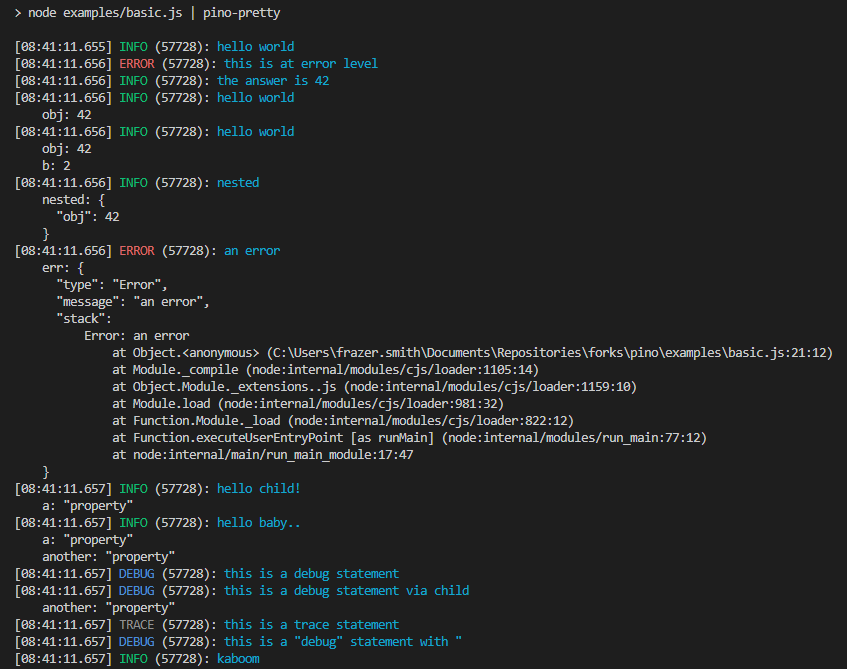
child.info('hello child!')Pipe it through pino-pretty in development for a readable stream.
// essentials
Log messages tend to accumulate over the life of an application. Pino is designed so that adding more of them never becomes the bottleneck.
Logging should not throttle your app. Pino does the minimum amount of work per line and in many cases is over 5x faster than the alternatives.
Every line is a JSON object with level, time, pid, hostname and your message, so any tool can parse it without a custom format.
Bind request ids, user ids or module names once and every line from that child carries them.
Ship, reformat or alert on logs from a worker thread, so processing never blocks the event loop.
Strip or mask sensitive paths like headers.authorization before they ever reach a destination.
Keep JSON in production and pipe through pino-pretty in development for a colourised, human-readable stream.
// development formatting
Pipe the output throughpino-prettywhile you work. Nothing changes in your code, and production keeps the machine-readable stream.
// the team


// acknowledgements
The project is kindly sponsored by
Start from the introduction, compare the numbers on the benchmarks page, or browse the examples in the repo.