
Introduction
Very low overhead JavaScript logger.
Runtimes
Node.js
Pino is built to run on Node.js.
Bare
Pino works on Bare with the pino-bare compatibility module.
Pear
Pino works on Pear, which is built on Bare, with the pino-bare compatibility module.
Install
Using NPM:
$ npm install pinoUsing YARN:
$ yarn add pinoIf you would like to install pino v6, refer to https://github.com/pinojs/pino/tree/v6.x.
Usage
const logger = require('pino')()

logger.info('hello world')

const child = logger.child({ a: 'property' })
child.info('hello child!')
This produces:
{"level":30,"time":1531171074631,"msg":"hello world","pid":657,"hostname":"Davids-MBP-3.fritz.box"}
{"level":30,"time":1531171082399,"msg":"hello child!","pid":657,"hostname":"Davids-MBP-3.fritz.box","a":"property"}
For using Pino with a web framework see:
- Pino with Fastify
- Pino with Express
- Pino with Hapi
- Pino with Restify
- Pino with Koa
- Pino with Node core
http - Pino with Nest
- Pino with Hono
Essentials
Development Formatting
The pino-pretty module can be used to
format logs during development:
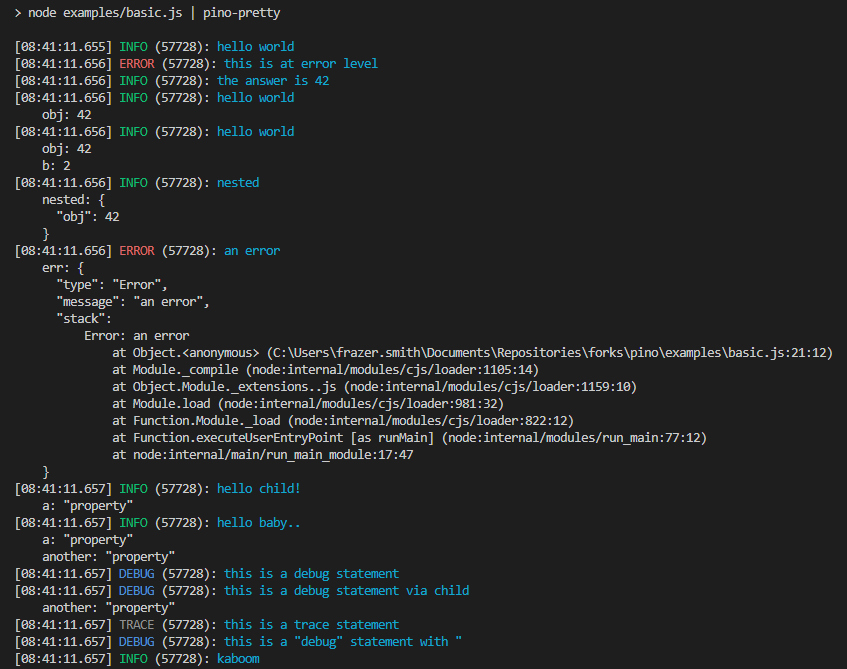
Transports & Log Processing
Due to Node’s single-threaded event-loop, it’s highly recommended that sending, alert triggering, reformatting, and all forms of log processing are conducted in a separate process or thread.
In Pino terminology, we call all log processors “transports” and recommend that the
transports be run in a worker thread using our pino.transport API.
For more details see our Transports⇗ document.
Low overhead
Using minimum resources for logging is very important. Log messages tend to get added over time and this can lead to a throttling effect on applications – such as reduced requests per second.
In many cases, Pino is over 5x faster than alternatives.
See the Benchmarks document for comparisons.
Bundling support
Pino supports being bundled using tools like webpack or esbuild.
See Bundling document for more information.